To my mind, there are two kinds of composite images.
The first is the kind that’s shot all at once in a single location. You’re getting different pieces of the image across multiple photos, but the lighting isn’t changing and your camera is stationary. You choose which photos you want to comprise your final image, and in Photoshop you layer them and mask in all the individual elements. This is pretty straightforward.
The second kind of composite image is the one that’s shot in different locations at different times. At least one location is a “real” place, the other is often the studio. This type of composite image is more fun because it’s harder from both a conceptual and technical standpoint, and planning the pieces and how they’ll fit together is very much like a puzzle. Lighting, camera position, and focal length all need to match, and this often takes some imagination at one stage of the shoot or another.
The image below is the second sort of composite, and below I’ll talk about the shoot and the edit, as well as my practical and creative considerations along the way.
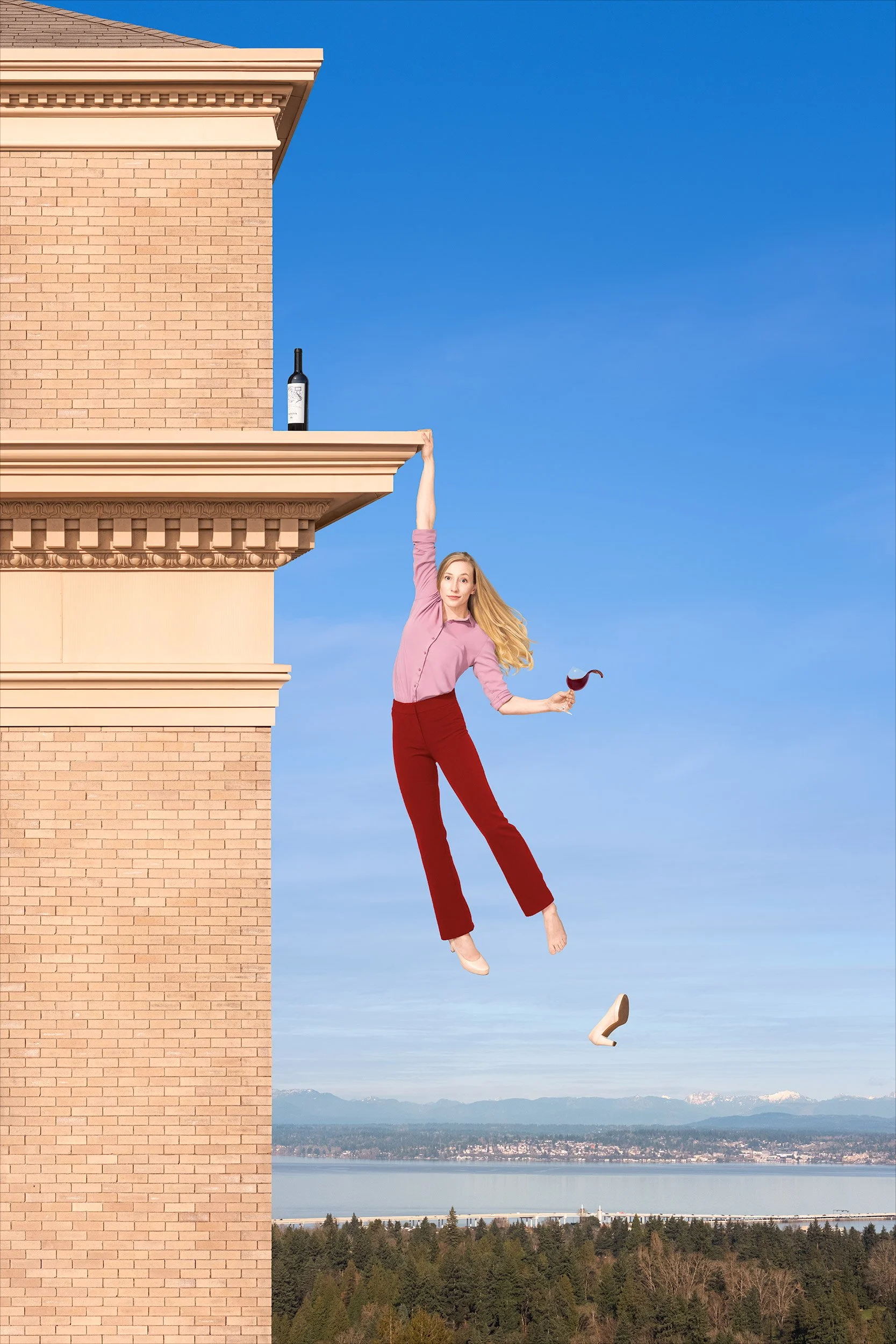
The image is made up of twenty-two individual pictures. More than you’d expect, right? You’re welcome to try to guess them, but here they are:
1. The building, an HDR panorama of nine drone images.
2. The background, a drone panorama of three images.
3. The bottle.
4. The shoe.
5. Sarah’s body (Sarah’s my model, but you figured that out yourself).
6. Sarah’s face.
7. Sarah’s right foot.
8. Sarah’s left foot.
9. Sarah’s beautifully flowing hair, a blend of two images.
10. Sarah’s left arm (starting at the elbow), holding the glass atilt.
11. The wine splash.
Goodness, you might say, the Sarah in the final photo is made up of eight exposures? That seems like a lot. Couldn’t you have gotten her all in one shot, with the body position and hair and wine splash and facial expression and everything? Theoretically, I suppose. But in practice, of course not—getting everything you want in a single image is kinda like setting those monkeys down at their typewriters to try and come up with Shakespeare. No, I’m not comparing this photo to The Merchant of Venice. I’m just saying you’d be at it a long, long, long time, and you’re far better off just building a Frankensarah.
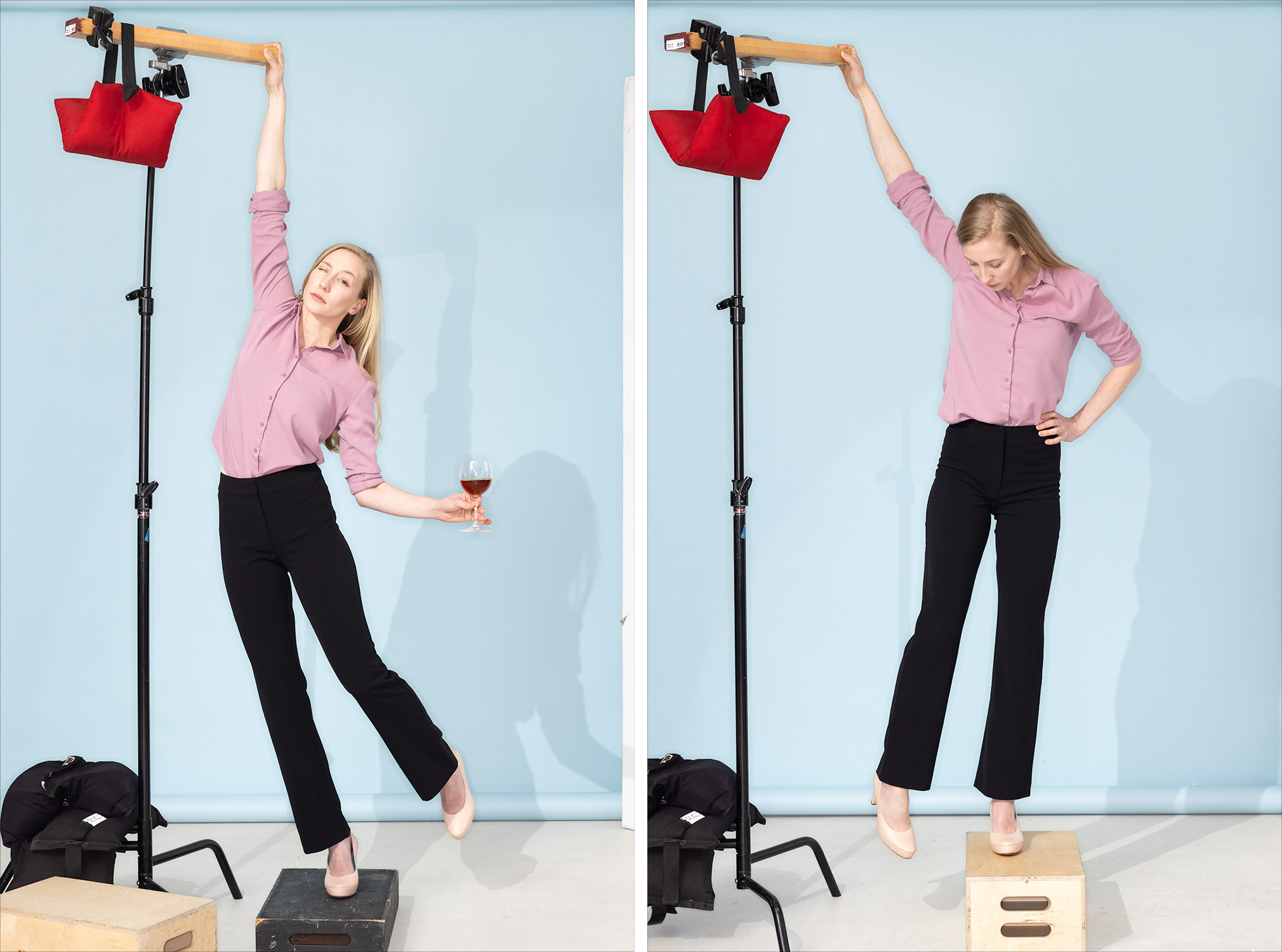
This was the studio setup. On the left, how I positioned Sarah for the shoot (although this wasn’t a frame I used) and on the right, the capture I used for her right foot. You can see why the foot composite was necessary. You can’t photograph her actually hanging by one arm for all kinds of practical reasons, and there’s no way for her to stand in heels that’ll make her foot look as though she’s not standing on something. So, we got her body positioned well and shot her feet and the empty shoe separately.
For Sarah’s flowing mane, I shot about a half dozen pictures of her whipping her hair off to the side. I used two of them to make her hair in the final picture.
You’ve probably already noticed that the pants were black to start with. Sarah didn’t have red pants in her wardrobe (well, she did but they were wrong for it), but I liked the shape of these so we went with them. I changed the color in Photoshop to complement the rest of the image. Black would’ve been too heavy.
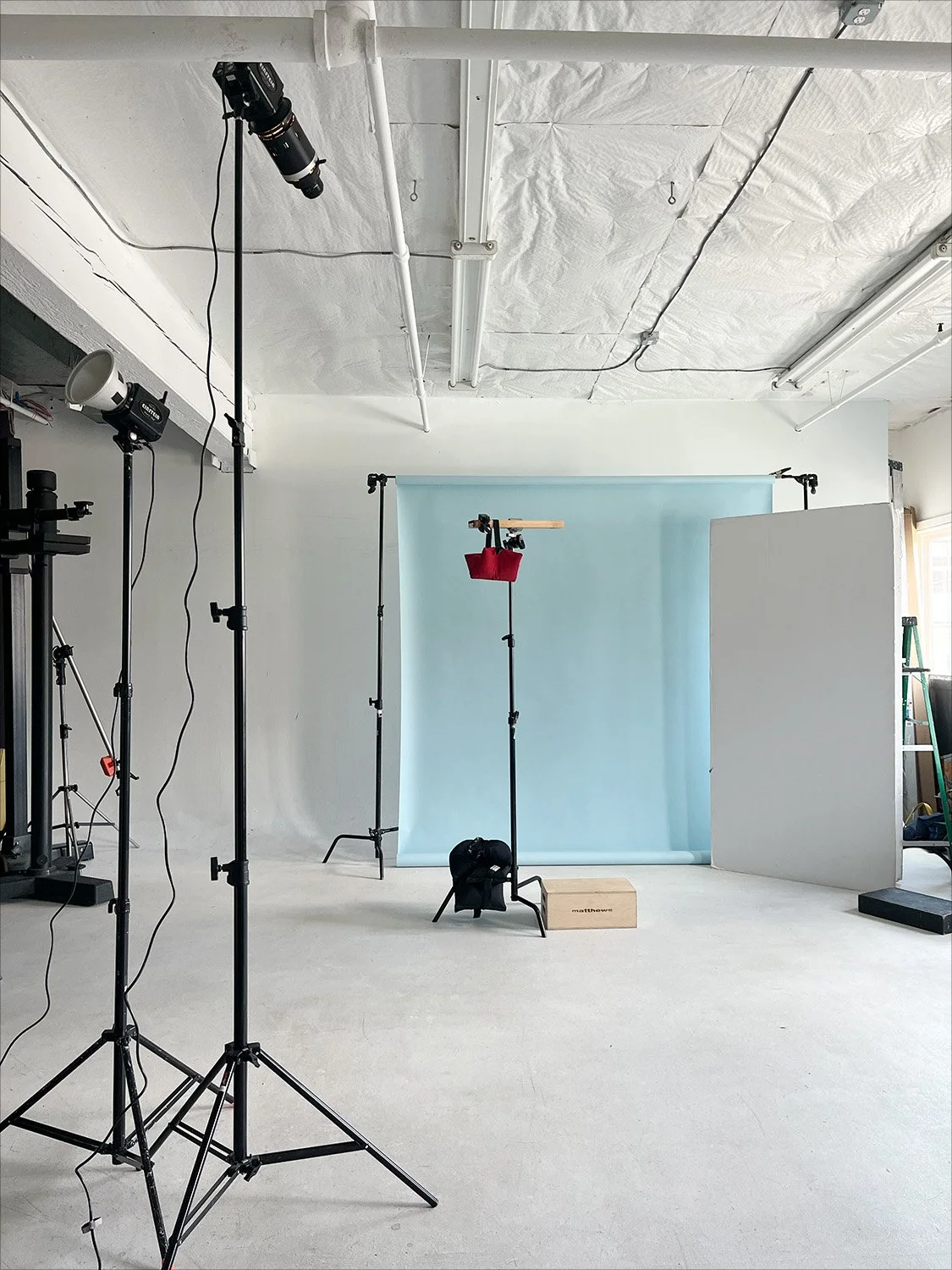
And here’s the studio lighting setup. It’s pretty simple, just three lights.
The one at the far left is bouncing light for a soft but directional fill.
Next to it, on the taller stand, is the main light. It’s a very directional light to mimic the sun in the photo of the building. The long, cylindrical attachment mounted on the front of this light is called an optical snoot. Inside it are lenses that focus the light from the strobe, lining it all up and aiming it in the same direction much like an overhead projector does. The result is a very hard light and sharp-edged shadows, like sunlight on a clear day. It’s a look you can’t otherwise get with a strobe.
The third light, not pictured, was a ring light on my camera for a smidge of front fill.
And at Sarah’s eight o’clock was a large piece of white foam core to bounce a little light in from the back.
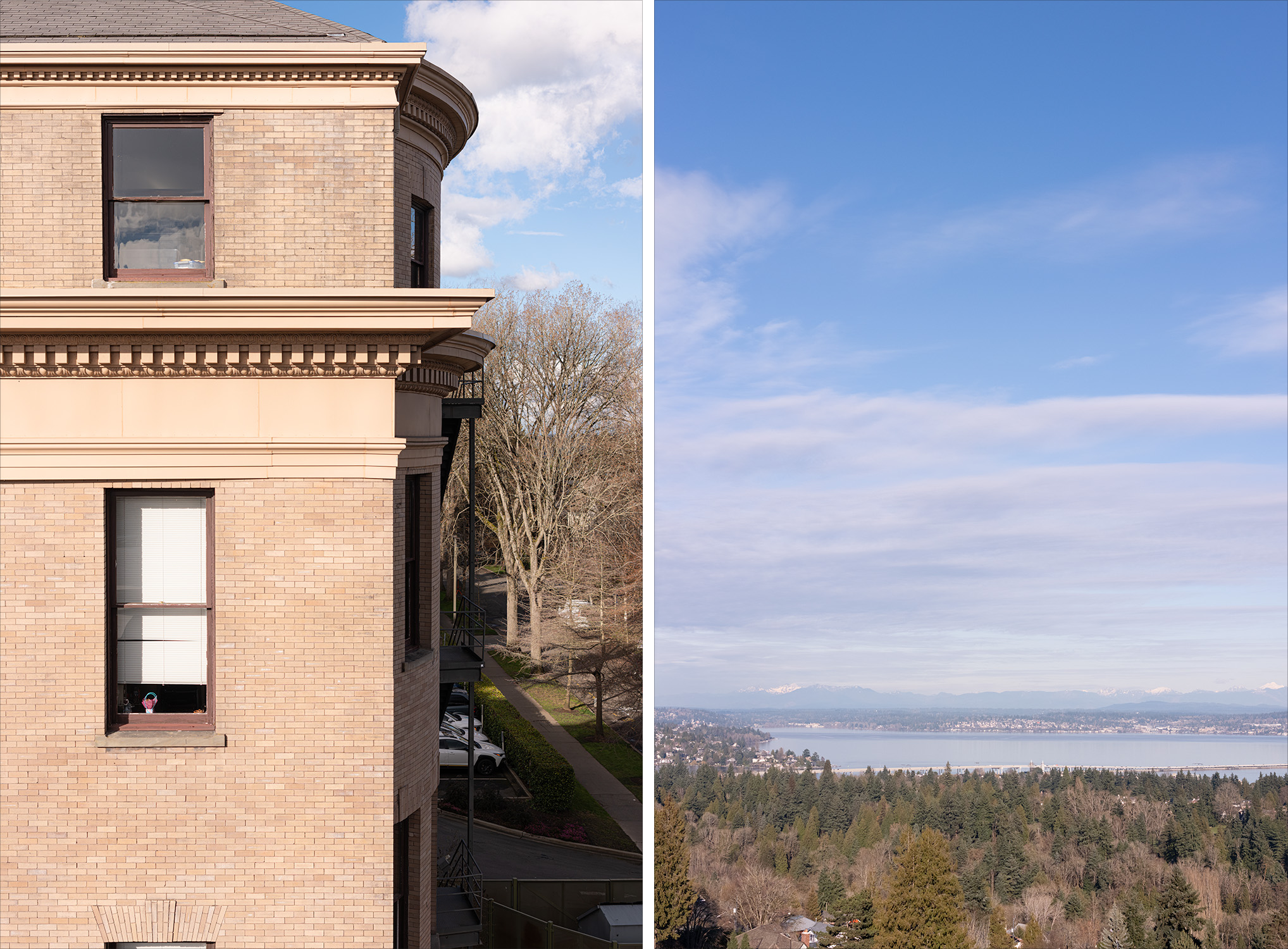
In this post I’m coming to the background last, but when making composite images, you finalize the environment first. The background is the foundation of the picture—its tomato base, if you will. You put the subject into the background; you don’t put the background behind the subject. I find it’s good to shoot backgrounds on a tripod so that I can step into frame as a stand-in for my model(s). It helps to make composition decisions, but it also provides a useful reference for how to approach lighting a model in the studio. I couldn’t get into this photo, of course, so I had to think a little harder about the space Sarah would occupy and the proper placement for the drone.
I also had to think about how I wanted Sarah to be lit, because when you’re shooting backgrounds, you have to think about how the light in the scene will work for your subject. I chose late afternoon for the building shot because I wanted the sun coming from camera left at about forty-five degrees. I knew that would look nice on Sarah, if there was also plenty of fill on her. There wasn’t any fill light on the building, of course—the shadows were pretty deep—so I had to shoot it in such a way that I could make it look like there was light filling in those shadows.
That’s partly why there are so many pictures that make up the photo of the building. As I mentioned before, the building is nine photos stitched together. That’s three pictures, top to bottom, and a bracket of three shots for each picture. With that exposure bracket, I could lift those dark shadows as much as I needed to make the lighting of the building and the lighting on Sarah match.
So why not just shoot the building in a single bracketed picture? Why nine pictures, instead of just three? That certainly would’ve been easier, but my done only shoots horizontals. That means I’d’ve had to crop the center out of a horizontal image to get the vertical shot I wanted, and I’d’ve wasted half the frame and ended up with a comparatively lo-res shot of the building. Instead, I shot the bracket of three for the center of the image, tilted the camera up for another bracket, and then down for a third bracket. Stitch those together and you get a beautifully (and unnecessarily) hi-res photo with vast dynamic range.
The building I chose for the picture was Holy Names Academy in Seattle’s Capitol Hill neighborhood. I wanted something that looked more classic than modern, with brick that was light in tone and warm in color, and I needed a fairly deep ledge for my model to hang from so she wouldn’t be too close to the building. Holy Names was perfect.
I did a fair amount of cleanup to the building, mostly straightening and leveling its many lines. I didn’t love the tired look of the brick in the building’s upper section as compared to the lower section, so I copied the lower brick and replaced it.
The sky, water, and trees was the view from a little higher and to the east of Holy Names. This was again a stitch of three photos to get a vertical image, but I didn’t bracket them. I made some contrast and color tweaks, muted the clouds a bit so Sarah would stand out, and removed the houses hiding in the trees. Otherwise, a pretty straight photo.
And…I think that’s it. There it is, a conceptual composite photo.
And look, Ma—no AI!